
The useful parts, close by
A real wallet, not a shortcut page.
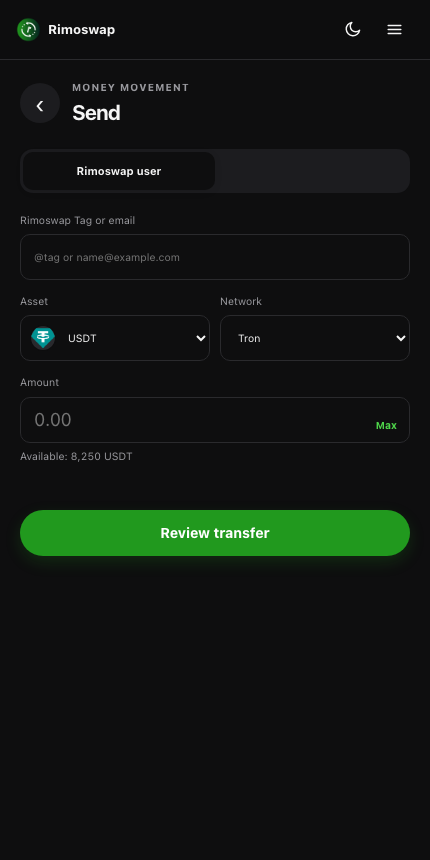
Every flow runs inside the extension, so you finish what you started without opening another tab.
Send without switching tabs
Pay a Rimoswap user or paste a compatible on-chain address, review the transfer and confirm it in the panel.
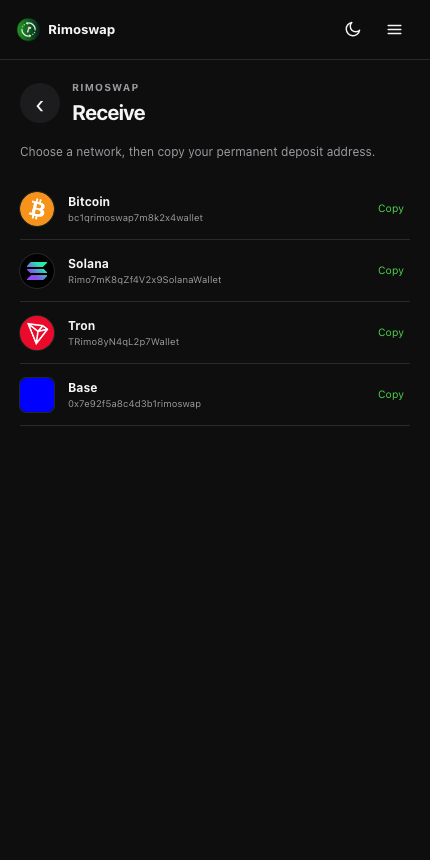
Copy the right deposit address
Choose Bitcoin, Tron, Solana, Base and other enabled networks, then copy your permanent receiving address.
Swap from the same balance
Get a live quote, see the fee and complete the exchange without opening the main website.
Request money with a link
Set the asset and amount, create a payment request and copy the link straight from the extension.
Know when money arrives
Background checks detect completed inflows and trigger a browser notification when your balance updates.
More when you need it
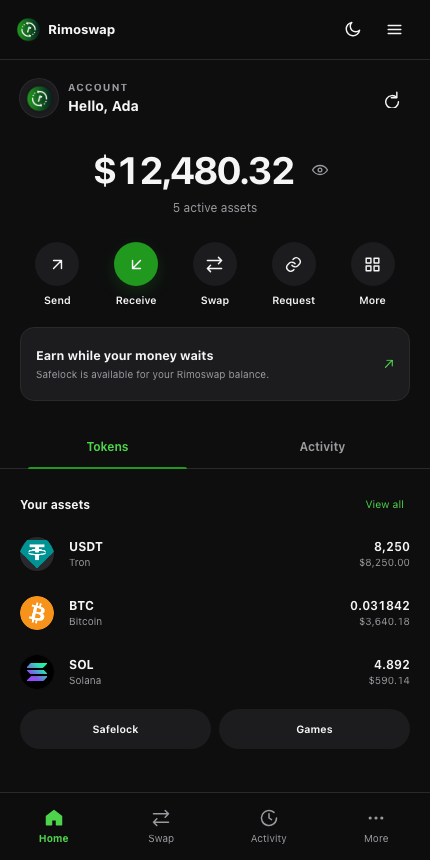
Multi-send, Safelock, games, activity and notifications follow the features enabled for your account.
Made to stay open
Move money while the rest of the web stays visible.
The side panel gives your wallet its own space, beside whatever tab you are on.
Install in four steps
From download to wallet in a minute.
Until the store listing is approved, install the downloaded folder once in Developer mode.
- 01
Download and extract
Download the ZIP, open it and move the extracted Rimoswap extension folder somewhere you will keep it.
- 02
Open your extensions page
In Chrome, enter
chrome://extensions. In Edge, enteredge://extensions. In Brave, enterbrave://extensions. - 03
Turn on Developer mode
Use the Developer mode switch near the top-right of the extensions page, then choose Load unpacked.
- 04
Select, pin and sign in
Select the extracted folder, pin Rimoswap from the Extensions menu, then click its icon and sign in to your account.
Browser support
One Chromium build. Three browsers.

Chrome
Ready
Install the downloaded folder now. Chrome Web Store listing comes next.
'%20x:href='%23a'%3e%3cstop%20offset='.76'%20stop-opacity='0'/%3e%3cstop%20offset='.95'%20stop-opacity='.5'/%3e%3cstop%20offset='1'/%3e%3c/radialGradient%3e%3cradialGradient%20id='f'%20cx='2523'%20cy='4680'%20r='20243'%20gradientTransform='matrix(-.03715%20.99931%20-2.12836%20-.07913%2013579%203530)'%20x:href='%23a'%3e%3cstop%20offset='0'%20stop-color='%2335c1f1'/%3e%3cstop%20offset='.11'%20stop-color='%2334c1ed'/%3e%3cstop%20offset='.23'%20stop-color='%232fc2df'/%3e%3cstop%20offset='.31'%20stop-color='%232bc3d2'/%3e%3cstop%20offset='.67'%20stop-color='%2336c752'/%3e%3c/radialGradient%3e%3cradialGradient%20id='g'%20cx='24247'%20cy='7758'%20r='9734'%20gradientTransform='matrix(.28109%20.95968%20-.78353%20.22949%2024510%20-16292)'%20x:href='%23a'%3e%3cstop%20offset='0'%20stop-color='%2366eb6e'/%3e%3cstop%20offset='1'%20stop-color='%2366eb6e'%20stop-opacity='0'/%3e%3c/radialGradient%3e%3cpath%20id='h'%20d='M24105%2020053a9345%209345%200%2001-1053%20472%2010202%2010202%200%2001-3590%20646c-4732%200-8855-3255-8855-7432%200-1175%20680-2193%201643-2729-4280%20180-5380%204640-5380%207253%200%207387%206810%208137%208276%208137%20791%200%201984-230%202704-456l130-44a12834%2012834%200%20006660-5282c220-350-168-757-535-565z'/%3e%3cpath%20id='i'%20d='M11571%2025141a7913%207913%200%2001-2273-2137%208145%208145%200%2001-1514-4740%208093%208093%200%20013093-6395%208082%208082%200%20011373-859c312-148%20846-414%201554-404a3236%203236%200%20012569%201297%203184%203184%200%2001636%201866c0-21%202446-7960-8005-7960-4390%200-8004%204166-8004%207820%200%202319%20538%204170%201212%205604a12833%2012833%200%20007684%206757%2012795%2012795%200%20003908%20610c1414%200%202774-233%204045-656a7575%207575%200%2001-6278-803z'/%3e%3cpath%20id='j'%20d='M16231%2015886c-80%20105-330%20250-330%20566%200%20260%20170%20512%20472%20723%201438%201003%204149%20868%204156%20868a5954%205954%200%20003027-839%206147%206147%200%20001133-850%206180%206180%200%20001910-4437c26-2242-796-3732-1133-4392-2120-4141-6694-6525-11668-6525-7011%200-12703%205635-12798%2012620%2047-3654%203679-6605%207996-6605%20350%200%202346%2034%204200%201007%201634%20858%202490%201894%203086%202921%20618%201067%20728%202415%20728%202952s-271%201333-780%201990z'/%3e%3cuse%20fill='url(%23b)'%20x:href='%23h'/%3e%3cuse%20fill='url(%23d)'%20opacity='.35'%20x:href='%23h'/%3e%3cuse%20fill='url(%23c)'%20x:href='%23i'/%3e%3cuse%20fill='url(%23e)'%20opacity='.4'%20x:href='%23i'/%3e%3cuse%20fill='url(%23f)'%20x:href='%23j'/%3e%3cuse%20fill='url(%23g)'%20x:href='%23j'/%3e%3c/svg%3e)
Microsoft Edge
Ready
The same Manifest V3 package and side-panel API are supported.

Brave
Ready
Brave uses Chromium extensions, so the Chrome package works here too.

Safari
Separate build
Most code can be shared, but Safari needs its own packaged and signed extension.
Questions before installing
Straight answers.
Does the extension hold a separate balance?+
No. It shows and uses the same balances attached to your Rimoswap account, so activity stays consistent across the web app, mobile app and extension.
Does it redirect me to Rimoswap.com?+
Not for its core features. Send, receive, request, swap, multi-send, activity, Safelock and enabled games run inside the extension through the Rimoswap API.
Is my password stored in the extension?+
No. Your password is sent to the Rimoswap sign-in endpoint and is not saved. The extension stores the returned session token in your browser's local extension storage.
Can I use this exact ZIP in Microsoft Edge?+
Yes. Edge supports Manifest V3 and the side-panel API used by this build. Load the same extracted folder from edge://extensions.
Can I install this ZIP in Safari?+
Not directly. Safari requires a Safari Web Extension package. We can reuse much of the interface and API code, but it needs a compatibility pass, Apple packaging, signing and App Store distribution.